Duplicating Tasks
The Tasks app allows you to duplicate tasks. The Duplicate Task feature is available for Review and Approval tasks as well as for Regular tasks (Private and Team). The task duplicate includes all attachments and values of the original task. The following are modified:
-
Name: Is set to "Copy <original task name>".
-
Created at: Is set to the date when the task duplicate is created.
-
Last modified: Is set to the date when the task duplicate is created.
-
Creator: Is set to the user who duplicated the task.
-
State: Is set to "Not started".
-
Stage: Is set to the initial value "Requested".
To duplicate a task:
-
Open the Detail panel of the task.
-
In the Details panel header, click the Menu button and select Duplicate Task.
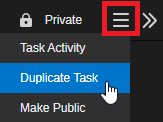
A copy of the task is created and directly opened in the Details panel. The name is "Copy <original task name>".
Once the Tasks list is refreshed (automatically or manually), the duplicate task is shown in the Tasks list.