Using the Search Settings App
 The Search Settings app allows system administrators to monitor the status of the search configuration, and obtain details about the search indexes.
When you access the Search Settings, the app provides a “live view” that auto-refreshes every 30 seconds. As shown in the following illustration, the page is divided into three main areas: the Search Settings header (top), the All Sites, All Systems area (middle), and the Site Details area (bottom).
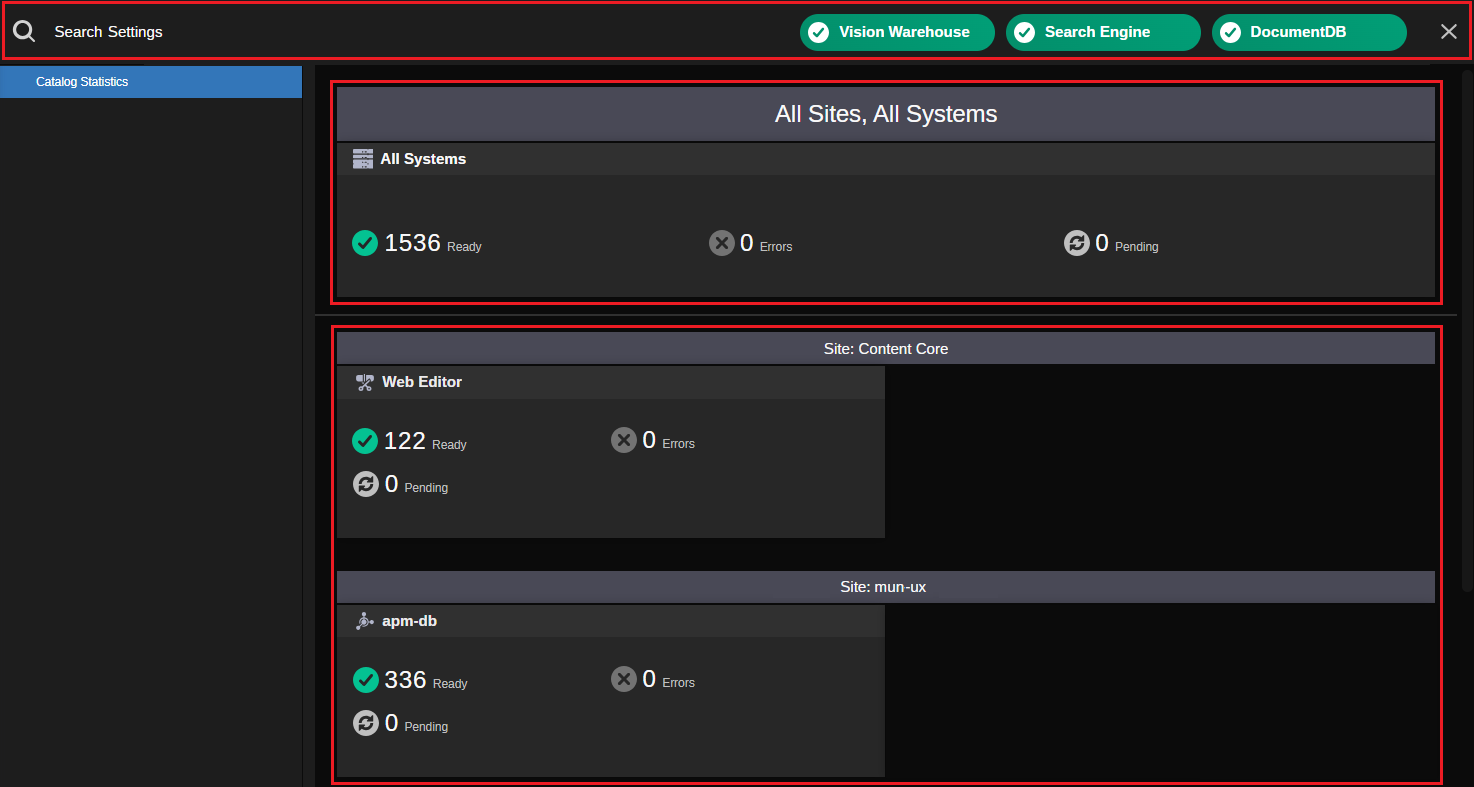
Also shown: Search Settings Sidebar (left), and the Details panel (right, not shown).
The Site Details area displays a series of cards that represent the search indexes for each of the connected systems. Each card displays the associated module's name and the index data for that individual system. Cards could represent the index that has been uploaded to ACC from an on-prem system — such as a MediaCentral Production Management module, or the index of an Avid Content Core integrated system that is capable of creating new content — such as the Web Editor. When you perform a search in Avid Content Core, you are searching across all of this indexed data.
As you work with the app, you might need to obtain more information about errors, warnings, or other details related to the indexing process. This information appears in the Details panel on the right-side of the app.
Reviewing the Search Settings Header
The header at the top of the app provides you with a health check of the back-end systems that enable the functionality in the Search app. If Avid Content Core determines that the system is performing as expected, the header shows a green label for the component. If a problem is detected, the component might appear as yellow or red, depending on the severity of the issue.
As shown in the following illustration, each component allows you to obtain additional status information by hovering your cursor over the health indicator. In the event of a warning or error, this tool-tip might help you identify the source of the problem.

Vision Warehouse
Vision Warehouse is an API that is part of Google's Vertex AI Vision that analyzes the proxy media uploaded to Avid Content Core to produce rich metadata such as:
-
Audio Transcripts
-
Optical Character Recognition data
-
Embeddings for semantic searches
-
And more
Vision Warehouse metadata is stored within Avid Content Core and is available only within Avid Content Core. It is not pushed back down to any local on-prem database.
This status button allows you to verify that Avid Content Core is communicating with Vision Warehouse. During normal operation, this health indicator should report that the "Vision Warehouse is online".
Search Engine
The Avid Content Core Search Engine is responsible for the indexing of annotations generated by ACC in Vision Warehouse. It also triggers the proxy analysis by Vision Warehouse. In addition this service passes search queries from the Search App to Vision Warehouse and provides post-processed results back to the front-end.
During normal operation, this health indicator should report that "Search API is online".
DocumentDB
Document DB is the database of the Aggregated Asset Store of Avid Content Core.
During normal operation, this health indicator should report that "DocumentDB is responding to commands".